
SimplifyC++ Article
From wxWidgets and Qt Widgets to Flutter: Did Google Reinvent the Widget?
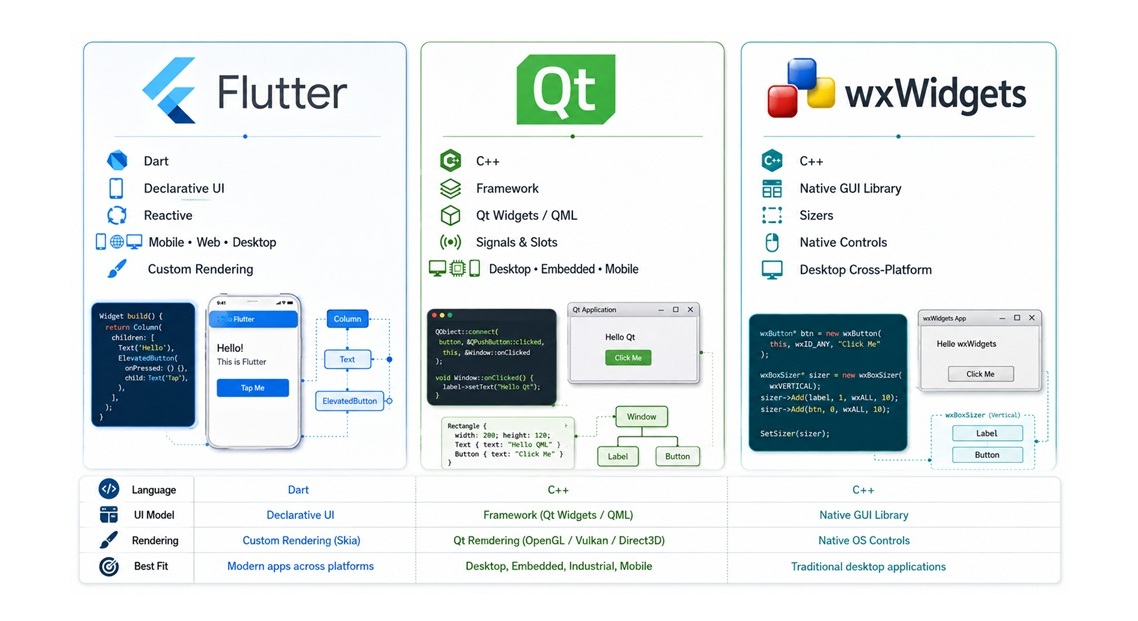
A Study of the Evolution of Cross-Platform UI Philosophy from C++ to Dart
When a programmer has actually worked with wxWidgets, Qt Widgets, and Flutter, it is difficult not to feel that something familiar travels with them from one framework to another.
A window contains elements.
Elements contain other elements.
Containers organize their children.
A layout system distributes available space.
Events flow from the user toward interface elements.
Complex components can be built from smaller components.
And above all of this stands one old dream:
Write the application once, and let it run on multiple operating systems.
But does this mean that Flutter is simply a modern reformulation of ideas that already existed in wxWidgets or Qt Widgets?
The more interesting answer is:
Yes, in terms of broad engineering lineage—but there is not enough evidence to claim direct borrowing.
In fact, studying the history of these frameworks reveals a larger story: the evolution of the Widget Toolkit itself—from traditional C++ libraries, through object-oriented GUI systems, to modern reactive and declarative user interfaces.
Before Flutter, There Was Dart—and a Serious Problem
Dart was introduced by Google in 2011 as a language designed particularly for building large, structured web applications, with the ambition of addressing some of the difficulties developers faced with JavaScript at the time.
In its original announcement, Google described two execution models for Dart: it could run on a Dart VM, or it could be compiled to JavaScript so that it would work in existing browsers.
Google also indicated that it would explore integrating the Dart VM directly into Chrome.
At one point, an experimental Chromium build containing the Dart VM was actually released.
Had that strategy succeeded, the history of web development might have looked very different today.
Browsers could potentially have supported two native application languages:
JavaScript + Dart
Dart might have become a genuine runtime competitor to JavaScript rather than merely a language compiled into it.
But the web does not belong to a single company.
Introducing a new browser-native programming language requires cooperation between Chrome, Firefox, Safari, Edge, standards organizations, browser vendors, and the broader web ecosystem.
That consensus never emerged.
In March 2015, Google announced a decisive change in strategy: the Dart VM would not be integrated into Chrome, and Dart's future on the web would focus primarily on compiling to JavaScript.
In practical terms, this meant that the original vision of Dart becoming a first-class native browser language had failed.
That does not mean Dart itself died. Google was already using it internally in significant projects, including Google Ads.
But its ambition to become a mainstream web language competing directly with JavaScript had suffered a major setback.
Then something happened that completely changed the language's future.
Flutter appeared.
Flutter Was Not Merely a Successful Framework—It Revived Dart
The project that eventually became Flutter began experimentally inside Google around 2014 under the name Sky.
Its goal was ambitious but commercially compelling: build high-quality user interfaces across multiple platforms while reducing development cost and time.
When Flutter 1.0 was released in December 2018, the engineering and business proposition was extremely strong:
Build applications for both iOS and Android using one framework and largely one codebase.
Suddenly, Dart had something it had struggled to obtain through the browser:
A compelling reason for developers to learn it.
The question was no longer:
Why should I learn Dart when browsers already understand JavaScript?
It became:
If Dart allows me to build both Android and iOS applications through Flutter from one codebase, why wouldn't I learn it?
That was an enormous strategic shift.
Flutter did not merely benefit from Dart.
Dart benefited from Flutter just as much—and perhaps even more.
The success of each began reinforcing the other.
Google also used the strength of its developer ecosystem to accelerate adoption. Flutter communities, meetups, events, Google Developer Experts, Discord and Slack groups, and developer communities appeared around the world.
This is not simply a technical lesson.
It demonstrates that successful technology depends on far more than good code:
Community, documentation, education, marketing, ecosystem development, and reducing the economic cost of adoption inside companies all matter.
An Important Correction: Dart Is Not Simply an “Interpreted Language”
It is tempting to associate Dart with its virtual machine and therefore describe it as an interpreted language.
That description is no longer technically accurate.
During development, Dart can use JIT compilation, which contributes to features such as fast Hot Reload.
For production native applications, Dart can use AOT compilation, producing native machine code for the target architecture.
For web applications, Dart can be compiled to JavaScript, and WebAssembly has also become an important compilation target.
Therefore, Flutter is not simply carrying around an interpreter that executes Dart source code instruction by instruction.
This distinction becomes particularly important when comparing Flutter with C++ applications built using wxWidgets or Qt.
But Decades Before Flutter, C++ Had Already Solved the Same Problem
This is where the comparison becomes truly interesting.
wxWidgets: The Idea Goes Back to 1992
Julian Smart started the wxWidgets project in 1992 at the University of Edinburgh.
The project he was working on required a graphical interface that could run on both Windows and Unix.
The solution was conceptually simple but technically powerful:
Create one API that hides the differences between operating systems.
The name itself reflected the original target platforms:
w = Windows
x = X Window System
Early implementations used technologies such as XView and MFC, and the project later evolved into multiple platform-specific ports.
Even today, wxWidgets describes itself as a C++ library that enables developers to write applications running on Windows, macOS, Linux, and other platforms while relying, wherever possible, on native operating-system controls.
Notice the core idea:
One API → Multiple Platforms
More than two decades before Flutter.
Qt: Another Solution to the Same Fundamental Problem
The conceptual origin of Qt goes back to around 1990, while its first public release appeared in 1995.
Haavard Nord and Eirik Chambe-Eng were working on C++ software that needed a graphical interface capable of running across Unix, Macintosh, and Windows.
Again, the same problem appeared:
How can an application be separated from the underlying windowing system?
And again, the solution involved a higher abstraction layer:
Widgets, events, layouts, and application services that hide platform differences.
This makes an important point clear:
Flutter did not invent cross-platform UI.
It entered a field that had already existed for decades.
The Widget Is Much Older Than Flutter
The word Widget itself is one of the reasons developers coming from wxWidgets or Qt may experience a strong sense of familiarity when opening Flutter.
In Qt we have:
QWidgetIn wxWidgets we have:
wxWindow
wxControl
wxButton
wxTextCtrl
In Flutter, the philosophy becomes:
Everything is a Widget.
But the idea of the widget predates all three frameworks and goes back to earlier GUI systems, including toolkits developed around Unix and the X Window System.
Therefore, similarity in terminology does not prove borrowing.
The architectural similarities, however, are much more interesting.
The Tree: The Structural Idea Shared by All Three Worlds
Graphical interfaces are naturally hierarchical.
You have a window.
Inside it, perhaps a panel.
Inside that panel, controls.
Some controls themselves behave like containers containing other controls.
wxWidgets has a parent-child hierarchy.
Qt Widgets also uses parent-child ownership heavily; a QWidget can contain child widgets,
and the parent relationship affects ownership, lifetime, positioning, visibility, and event handling.
Flutter also has a Widget Tree.
But Flutter goes further.
The Widget itself is not necessarily a heavy, persistent graphical object corresponding directly to the on-screen component.
Flutter widgets are primarily immutable configuration objects.
They are used to construct an Element Tree, which in turn interacts with a RenderObject Tree responsible for layout, painting, hit testing, and rendering.
This is a profound difference.
In wxWidgets and Qt Widgets, developers usually hold an object representing the actual interface component and modify its state.
Flutter instead asks:
What should the interface look like in the current application state?
The framework then determines how to update the persistent rendering structures.
And Here We Find Flutter's Clearly Documented Influence: React
If we want to discuss historical influence seriously, this point cannot be ignored.
Flutter's own architectural documentation explicitly describes its reactive model as being influenced by React.
The conceptual relationship can be summarized as:
UI = f(state)The user interface is considered a function of application state.
Instead of manually modifying every existing GUI object when something changes, the framework rebuilds the relevant description of what the interface should look like.
Flutter documentation also explains that its Widget concept was influenced by component-oriented approaches such as React.
Therefore, if we are searching for a documented direct influence on Flutter's programming model, React has far stronger evidence than either wxWidgets or Qt Widgets.
That makes the historical analysis more accurate.
Why, Then, Does Flutter Feel So Familiar to a wxWidgets Programmer?
Because React did not invent the entire GUI problem either.
Flutter effectively combines two long-standing traditions:
Portable GUI Toolkits
such as wxWidgets, Qt, and their predecessors,
with:
Declarative Reactive User Interfaces
popularized by modern systems such as React.
The result is a framework that feels distinctly modern while still solving many of the same structural problems GUI programmers have faced for decades.
Layout: Perhaps the Most Striking Similarity
This may be one of the strongest similarities noticed by experienced wxWidgets users.
In wxWidgets we have Sizers:
wxBoxSizer
wxFlexGridSizer
wxGridSizer
Their purpose is to avoid depending entirely on absolute coordinates.
Instead, developers describe relationships between components, and the layout system calculates their final sizes and positions.
Qt Widgets uses the same general principle through:
QHBoxLayout
QVBoxLayout
QGridLayout
QFormLayout
Then we come to Flutter:
Row
Column
Flex
Stack
Expanded
Padding
Center
The underlying philosophy is remarkably similar:
Do not manually specify the exact position of every component. Describe the geometric relationship between components and let the layout engine calculate the result.
Flutter, however, takes composition much further.
Instead of Padding merely being a property on a component, Padding itself can be a Widget
containing another Widget.
Instead of setting an alignment property on an existing object, you may wrap the component inside
Center.
This reflects Flutter's strong preference for composition over deep inheritance hierarchies.
A Fascinating Development: wxWidgets Concepts Can Map Naturally onto Flutter
A particularly interesting modern development strengthens this comparison.
The wxWidgets ecosystem has explored Dart-oriented APIs capable of using Flutter as a backend while exposing abstractions inspired by wxWidgets.
In such a model, something conceptually similar to:
wxBoxSizer(wxHORIZONTAL)can naturally correspond to Flutter's:
RowLikewise, vertical box-layout concepts translate naturally into:
ColumnThis does not prove that Flutter originally borrowed its architecture from wxWidgets.
But it proves something else that is arguably just as interesting:
The two structural models are similar enough that wxWidgets-style abstractions can be mapped naturally onto Flutter layout concepts.
That helps explain why experienced wxWidgets developers may experience such a strong sense of familiarity when encountering Flutter.
Events: Three Different Solutions to the Same Problem
Every GUI system eventually has to answer the same question:
What happens when the user presses a button?
wxWidgets historically used Event Tables and later introduced highly flexible mechanisms such as
Bind().
Qt introduced one of the most famous communication models in GUI programming:
Signals and Slots.
A button emits a signal, and the signal can be connected to a slot or callable handler without requiring tight coupling between the two objects.
Flutter commonly uses callbacks together with application state and reactive updates.
The mechanics differ considerably.
But conceptually, the systems are solving the same fundamental problem:
GUI components must communicate user actions and state changes across an application.
Imperative vs Declarative: Where Flutter Truly Separates from Its Predecessors
Consider a label.
In wxWidgets, conceptually, we might write:
label->SetLabel("Ready");In Qt:
label->setText("Ready");An existing object is present, and we directly change its state.
This is imperative UI programming.
Flutter approaches the problem differently.
You do not necessarily tell Flutter:
Find the old Text object and change it.
Instead, application state changes, and the framework is told:
In the current state, the UI contains a Text widget with this value.
Flutter then rebuilds the relevant declarative representation and updates the underlying rendering structures accordingly.
This distinction between imperative and declarative UI is one of the deepest architectural differences between Flutter and traditional wxWidgets/Qt Widgets programming.
Comparison Table
| Aspect | wxWidgets | Qt Widgets | Flutter |
|---|---|---|---|
| Primary language | C++ | C++ | Dart |
| Origins | 1992 | Concept around 1990, public release 1995 | Experimental work around 2014, Flutter 1.0 in 2018 |
| Primary goal | Cross-platform desktop GUI | Cross-platform application framework | Cross-platform UI framework |
| Traditional UI model | Imperative | Imperative | Declarative / Reactive |
| Fundamental UI unit | Window / Control | QWidget | Widget |
| Layout system | Sizers | Layout Managers | Composition + Layout Widgets |
| Event model | Events / Bind | Events + Signals & Slots | Callbacks + State |
| Rendering philosophy | Strong use of native controls where available | Qt-controlled widgets with platform styles and integration | Flutter-controlled rendering pipeline |
| Parent/Child Tree | Yes | Yes | Yes, plus Widget/Element/Render trees |
| Native controls | Major architectural goal | Platform integration through Qt abstraction and styling | Generally framework-rendered UI |
| Traditional strength | Desktop applications | Desktop, embedded, application frameworks | Mobile, then web and desktop |
| Reuse philosophy | Inheritance + Composition | Inheritance + Composition | Strong emphasis on Composition |
| UI updates | Mutate existing objects | Mutate existing objects | State produces a new widget description |
wxWidgets and Qt Widgets Are Closer to Each Other Than Either Is to Flutter
If we set marketing terminology aside and look purely at architecture, we find that:
wxWidgets ↔ Qt Widgets
are much closer relatives.
Both emerged from the era of C++ desktop GUI toolkits.
Both typically work with relatively long-lived GUI objects.
Both rely substantially on object-oriented inheritance.
Both use layout managers.
Both use event loops.
Both were designed primarily around traditional desktop application development.
Flutter shares the same general problem domain and some structural abstractions, but belongs to a different architectural generation.
In fact, the more accurate Qt comparison is not always:
Flutter vs Qt Widgets
but, in some respects:
Flutter vs Qt Quick / QML
Qt Quick also provides a more declarative approach to user-interface development, particularly for dynamic and highly visual interfaces.
That reveals something important.
Flutter can be understood as combining:
the portability goals of traditional Widget Toolkits
with:
the declarative philosophy of modern reactive interfaces.
Did Qt Influence wxWidgets, or Did wxWidgets Influence Qt?
Historically, the chronology does not support an easy answer.
The idea behind Qt appeared around 1990, while wxWidgets began in 1992.
However, Qt's first public release came later, in 1995.
Meanwhile, the documented early development of wxWidgets shows strong connections to technologies such as MFC, XView, Motif, and later GTK—not Qt.
So there is no strong foundation for claiming that one framework was simply copied from the other.
The more plausible explanation is that both teams were solving the same emerging software-engineering problem:
How do we write one C++ GUI that works across multiple operating systems?
When competent engineers solve the same problem under similar constraints, they often arrive at surprisingly similar abstractions.
This is sometimes described as:
Convergent Evolution.
Was Flutter Designed by Someone Who Had Mastered wxWidgets?
This is where we must separate engineering intuition from historical evidence.
A developer who has used wxWidgets extensively and later studies Flutter may genuinely feel:
Whoever designed this must have understood wxWidgets very well.
That reaction is understandable.
The layout concepts, hierarchical structure, reusable components, cross-platform goals, and general Widget vocabulary create a strong sense of familiarity.
However, the publicly available historical evidence does not establish that wxWidgets was a direct design source for Flutter.
Nor is there sufficient evidence to state as fact that Flutter's original designers were experienced wxWidgets programmers.
By contrast, Flutter's relationship to React-style reactive UI programming is explicitly documented.
Several of Flutter's early contributors also came from browser and rendering-engine backgrounds involving projects such as WebKit, Chrome, and Blink.
Therefore, it would not be historically responsible to present the claim:
“Flutter was designed by someone who was clearly a wxWidgets expert.”
as an established fact.
A stronger and more defensible conclusion is:
Flutter independently arrived at many abstractions that earlier GUI toolkits had already proven useful, then reformulated them within a modern reactive and declarative architecture.
That is arguably more interesting than direct copying.
Another Fundamental Difference: Who Draws the Button?
This is one of the largest philosophical differences among these frameworks.
wxWidgets is famous for attempting to use native operating-system controls wherever practical.
A button on Windows is therefore closely tied to the native Windows GUI system.
On macOS, corresponding native platform mechanisms are used.
This produces one of wxWidgets' strongest characteristics:
Native look and feel.
Qt takes a somewhat different approach.
Qt Widgets provides its own abstraction and rendering infrastructure while using platform integration
and QStyle mechanisms to reproduce or integrate with the visual conventions of the host
operating system.
Flutter made a more radical decision.
Flutter wanted much greater control over every pixel.
Its Material and Cupertino libraries sit above Flutter's own rendering architecture.
This explains one of Flutter's major strengths:
The application can look extremely consistent across different platforms.
But it also explains one of wxWidgets' major strengths in a different category of software:
When building a traditional desktop application that should feel deeply native to the operating system, native widgets can be a significant advantage.
Why wxWidgets Can Be a Very Logical Choice for a Systems Tool or Assembler Editor
There is an important difference between a consumer mobile application and software such as:
- Compiler IDEs
- Debuggers
- Hex editors
- Assembly editors
- Database tools
- Engineering applications
- Binary analysis tools
- Low-level development environments
These applications often require sophisticated:
Menus, toolbars, status bars, trees, lists, splitters, dialogs, keyboard accelerators, file handling, clipboard integration, drag-and-drop, native dialogs, high-DPI support, and sometimes intensive custom drawing.
This is precisely the environment in which wxWidgets and Qt Widgets have matured for decades.
Flutter can certainly build desktop applications.
But its historical roots and architectural culture emerged primarily from modern mobile reactive UI development.
wxWidgets, in contrast, was born specifically from the problem of portable desktop software.
For a project such as an Assembler Editor or Systems Programming Tool, choosing wxWidgets therefore does not necessarily mean choosing an old technology out of nostalgia.
It can be a completely rational engineering decision:
C++ application + native desktop integration + mature controls + low conceptual distance from the operating system + cross-platform portability.
The Fascinating Part Is That History Has Come Full Circle
In the 1990s, the question was:
How do we hide the differences between Windows, Unix, and Mac from a C++ application?
wxWidgets and Qt answered that question.
Later, a new question became commercially important:
How do we build both an iOS and Android application from one codebase?
Flutter answered that problem.
Flutter then expanded toward web and desktop systems.
And now we increasingly see bridges between these worlds, including projects attempting to expose wxWidgets-style abstractions to Dart or map traditional GUI concepts onto modern Flutter backends.
The boundary between these architectural schools is therefore less rigid than it initially appears.
Flutter Did Not Invent Widgets—but It Redefined Their Role
The evolution can be summarized this way.
wxWidgets
A Widget is generally an interface to a concrete GUI object, often backed by or closely connected to a native operating-system control.
Qt Widgets
A Widget is a rich C++ object inside a sophisticated hierarchy involving painting, events, layouts, styles, and Signals and Slots.
Flutter
A Widget is primarily an immutable configuration describing what part of the user interface should look like at a particular moment.
This is where much of Flutter's architectural elegance lies.
Its breakthrough was not inventing the Widget.
It was transforming the Widget into something closer to:
A disposable declarative description of the UI
while keeping more persistent structures behind it, such as the Element Tree and RenderObject Tree.
Google's Commercial Brilliance Was Choosing the Right Problem
Dart originally tried to enter an extraordinarily difficult battle:
Introduce a new browser-native language alongside JavaScript.
Success required cooperation from an ecosystem that Google did not fully control.
Flutter redirected Dart toward a different problem:
Can one development team build multiple applications from one codebase?
The economic value was immediately understandable.
If a company can reduce duplicated code between iOS and Android, reduce fragmentation between platform teams, speed up product delivery, and reuse more development knowledge, then the technology provides a direct financial argument for adoption.
That is much more compelling than merely arguing that a new programming language is cleaner than JavaScript.
Community Was Part of Flutter's Commercial Architecture
Flutter should not be studied purely as source code.
Google built around it:
Documentation, conferences, local communities, meetups, developer groups, educational material, Google Developer Experts, online communities, and extensive ecosystem support.
Even during Flutter's relatively early stages, developer events were being organized in dozens of countries.
Its growth was therefore not purely accidental.
There was:
A capable framework + an appropriate language + a real business problem + a powerful corporate sponsor + an intentionally cultivated developer community.
That combination is rare.
Conclusion: Is Flutter a Modern wxWidgets?
Not literally.
But the question itself reveals something important.
If we inspect the APIs superficially, the differences are enormous.
If we examine the programming model, Flutter is much closer to React-style declarative UI than to traditional wxWidgets.
But if we move one abstraction level higher and ask:
What engineering problem are these systems ultimately trying to solve?
the similarity becomes very strong.
They all tell the programmer:
Do not treat Windows, macOS, Linux, Android, and iOS as entirely separate application universes. Build against a higher-level model and let the framework translate between the application and the platform.
wxWidgets approached that problem through native-oriented C++ GUI abstraction.
Qt built a much broader C++ application framework around the same general goal.
Flutter reformulated cross-platform GUI development around reactive state, declarative composition, and a highly controlled rendering pipeline.
It is historically inaccurate to claim that Flutter invented cross-platform widgets.
wxWidgets and Qt had already been solving that problem for more than two decades.
It would also be inaccurate to claim, without evidence, that Flutter was copied directly from wxWidgets or that its founders were necessarily experienced wxWidgets developers.
The documented influence of React on Flutter's reactive architecture is much clearer.
But it would be equally mistaken to ignore the obvious engineering kinship.
Widget trees, parent-child relationships, layout management, events, composition, custom controls, and cross-platform abstractions all belong to a long history of graphical user-interface engineering.
Flutter did not emerge from a vacuum.
It took an old engineering problem and placed it within a different technological era.
And this is perhaps the most important lesson.
In software engineering, good ideas rarely disappear.
They evolve, change form, move into new languages, adapt to new hardware, and return in new generations of frameworks.
From wxWidgets and Qt to Flutter, we are not simply seeing one framework replace another.
We are watching:
One fundamental engineering idea evolve across three different generations of software development.
What did you think?
Sign in to react or comment.
Comments
0No comments yet.