
SimplifyC++ Article
From Hand-Built DOS Interfaces to Modern GUIs: How C++ User Interface Programming Has Changed
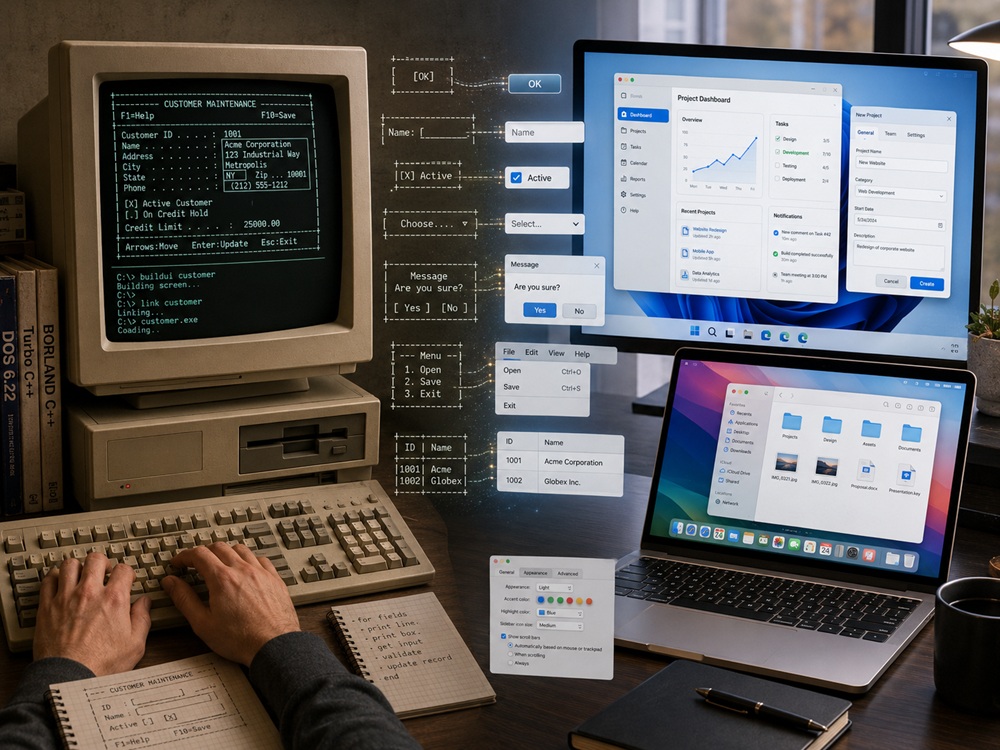
For developers who began programming in the era of Windows, macOS, and modern Linux, it can be difficult to imagine how much work once fell directly on the programmer when building user interfaces under DOS.
Today, if you need a field for entering a user's name, you simply create something such as a TextBox. If you need a button, you create a Button. If you need a list of choices, you use a ComboBox.
You position the control, connect it to an event, and most of its fundamental behavior is already implemented.
Under DOS, however, the operating system generally did not provide these user interface elements in the way modern graphical systems do.
The programmer often had to create both the appearance and the behavior. That is the fundamental difference between the two eras.
A Simple Example
Imagine that we want to build a small dialog asking the user for a name and country:
┌──────────────────────────────┐
│ User Information             │
│                              │
│ Name:    [______________]    │
│ Country: [Saudi Arabia ▼]    │
│                              │
│        [ OK ] [ Cancel ]     │
└──────────────────────────────┘
To a modern developer, this is an extremely simple interface.
It could be built from:
- Text Box
- Combo Box
- Buttons
- Dialog
But under DOS, unless you were using a library that already provided such controls, there was usually no equivalent of simply calling:
CreateTextBox()Instead, much of the interface had to be implemented manually.
Under DOS, There Was No Real "Button" — Only Something That Looked Like One
If you displayed:
[ OK ]you had not necessarily created a real button.
You had simply drawn characters that visually resembled one.
To make it behave like a button, the program might also need to:
- Draw the button.
- Remember its coordinates.
- Detect whether the mouse pointer was inside it.
- Detect a mouse click.
- Change its appearance while pressed.
- Allow activation with Enter or another key.
- Allow keyboard focus using Tab.
- Execute the requested action.
In other words:
[ OK ]was initially just a drawing.
A modern:
Buttonis a complete software component with behavior already defined.
A Text Box Was Not Just a Rectangle Either
A modern text field normally provides many behaviors automatically:
Cursor
Selection
Backspace
Delete
Arrow Keys
Copy
Paste
Focus
Keyboard Input
Under DOS, if you drew:
Name: [______________]you might still have to implement:
- Where the cursor appears.
- What happens when a character is typed.
- How Backspace behaves.
- What happens when the field becomes full.
- Whether arrow keys can move through the text.
- What Tab does.
- How focus moves to the next field.
The programmer was therefore not merely creating the appearance of an input box.
In effect, the programmer was also implementing a small text editor inside it.
What Did a DOS Screen Actually Look Like to the Programmer?
One of the most common DOS text modes used a screen organized as:
80 columns × 25 rowsA useful way for a modern developer to imagine this is as a very small spreadsheet.
Each position contained a character, such as:
A
B
+
-
│
┌
┐
Windows and dialog boxes could therefore be drawn using box-drawing characters:
┌────────────────────┐
│                    │
│     Application    │
│                    │
└────────────────────┘
This was not necessarily a window managed by an operating-system window manager.
It was often simply a carefully arranged collection of characters placed on the screen by the application itself.
For a modern programmer, one useful comparison is drawing an entire custom interface inside a Canvas and then implementing all interaction manually.
A Modern Analogy for Understanding DOS
In a modern GUI toolkit, you can essentially say:
Give me a Button.In traditional DOS programming, the model was often closer to:
Give me the screen.
I will draw the button myself.
This is actually similar to what happens today when developers use lower-level graphics and multimedia technologies such as SDL, SFML, Canvas, OpenGL, Vulkan, or Direct3D to create a completely custom interface.
Those technologies may provide:
Window
Pixels
Keyboard
Mouse
Rendering
but the application may still be responsible for creating the visual controls.
Even the Mouse Did Not Understand What a Button Was
A mouse system fundamentally reports information such as:
Mouse position:
X = 150
Y = 80

Left button = pressed
But who decides that coordinates 150, 80 are located inside an
OK button?
The application does.
A simplified implementation might look like:
if (mouseX >= left &&
    mouseX <= right &&
    mouseY >= top &&
    mouseY <= bottom)
{
    // Mouse is inside the button
}
The program would then need to determine whether a click occurred.
Modern GUI frameworks hide most of this behind concepts such as:
OnClick
Bind(...)
connect(...)
That difference alone demonstrates how much abstraction modern GUI frameworks provide.
Keyboard Focus Was Not Free Either
In a modern application, pressing:
Tabmay automatically move focus through:
Name
 ↓
Country
 ↓
OK
 ↓
Cancel
A GUI toolkit usually manages much of this behavior.
In a manually implemented DOS interface, the application itself might keep something equivalent to:
currentControl++;and then redraw the newly selected field or button differently.
Even the concept:
Which control currently has focus?could therefore belong entirely to the application.
Then DOS Graphics Became More Advanced
DOS applications were not limited to text mode.
Programs could use graphics hardware and standards such as:
- CGA
- EGA
- VGA
- SVGA
Developers could then draw pixels, lines, circles, text, and images.
But this did not automatically solve the user-interface problem.
Being able to draw:
Rectangleis not the same as receiving:
ButtonThis distinction remains important even today.
Graphics Library vs GUI Toolkit
A Graphics Library typically gives you primitives such as:
Pixel
Line
Rectangle
Circle
Image
Text
A GUI Toolkit gives you higher-level components such as:
Button
TextBox
List
Menu
Dialog
Tree
Tabs
The first helps you draw.
The second helps you build an interactive application interface.
BGI: Graphics Became Easier, but the Interface Was Still Mostly Your Responsibility
One of the best-known graphics technologies available to developers using Turbo C and Borland C/C++ was:
Borland Graphics Interface — BGI
Instead of dealing directly with every detail of graphics hardware, developers could use functions such as:
line(...);
rectangle(...);
circle(...);
outtextxy(...);
This represented a major improvement.
But BGI primarily helped the programmer draw graphics.
If you wrote:
rectangle(100, 100, 200, 140);you had created a rectangle.
You had not automatically created a complete button.
You might still need to implement:
Mouse handling
Keyboard handling
Focus
Pressed state
Events
In that sense, BGI is conceptually closer to modern graphics and multimedia libraries such as SDL or SFML than to complete widget frameworks such as Qt Widgets or wxWidgets.
Turbo Vision: When Interfaces Became Components
One of the most important tools of that era was:
Turbo Vision
Turbo Vision represented a major conceptual step forward.
Instead of dealing only with characters and screen coordinates, programmers could work with concepts such as:
Window
Dialog
Menu
Input Field
List
Button
Radio Button
Check Box
The display was still primarily text mode, but the programming model had become much closer to modern GUI development.
Instead of thinking:
Draw four lines and monitor the mouse.
the developer could increasingly think:
Create a dialog and add controls to it.
That was a major shift in abstraction.
The Fundamental Change: From Drawing to Widgets
The evolution can be summarized simply.
Earlier Approach
Draw something
      +
Write its behavior
Modern Approach
Create a controlA modern widget is not merely an image on the screen.
It is a software object that may contain:
Appearance
Behavior
Events
Focus
State
Keyboard support
Mouse support
Accessibility
Theme
This higher level of abstraction is one of the main reasons modern application development can be dramatically more productive.
What Did Windows Change?
Windows did not merely give programmers a graphical display.
It also provided standardized user-interface controls.
Examples include:
Button
Edit
ListBox
ComboBox
ScrollBar
Dialog
Later, richer common controls became widely available:
Tree View
List View
Tabs
Toolbar
Progress Bar
The operating system now understood the concept of a:
Buttonrather than merely displaying a rectangle that happened to look like one.
Why Standardized Controls Were So Important
Standard controls did not only make programmers more productive.
They also created a common visual and behavioral language for users.
When users saw:
[ OK ]they knew what it meant.
When they saw:
[✓] Enable Soundthey recognized a check box.
When they saw:
Country: [Saudi Arabia ▼]they expected a list of choices.
Keyboard conventions also became increasingly standardized:
Tab
Enter
Esc
Ctrl+C
Ctrl+V
GUI systems therefore simplified not only the programmer's work, but also the user's learning process.
Who Manages the Windows?
Under DOS, an application often effectively owned the entire screen.
In Windows, macOS, GNOME, KDE, and other graphical desktop environments, several applications may coexist:
Browser
Editor
Terminal
File Manager
Your Application
The graphical system manages concepts such as:
Window position
Window size
Minimize
Maximize
Focus
Overlapping windows
Clipping
Repainting
This represents an enormous amount of infrastructure that application developers no longer need to recreate themselves.
macOS and Linux Followed the Same General Evolution
Windows is only one example.
macOS provides mature graphical frameworks and standardized controls for windows, buttons, text fields, menus, dialogs, and many other user-interface elements.
Linux is somewhat different because it does not have one universal desktop GUI toolkit.
Instead, desktop environments commonly rely on toolkits such as:
- GTK, strongly associated with GNOME.
- Qt, strongly associated with KDE Plasma.
Despite implementation differences, the basic idea remains the same:
The toolkit provides reusable interface components instead of forcing every application to invent its own buttons, dialogs, text fields, and menus.
From Polling Loops to Event-Driven Programming
Many DOS programs used logic conceptually similar to:
while (running)
{
    readKeyboard();
    readMouse();
    updateProgram();
    drawScreen();
}
The application continually asked:
Did something happen?
Modern GUI programming is largely event driven:
User clicks
     ↓
Operating System
     ↓
GUI Toolkit
     ↓
Click Event
     ↓
Your Function
In wxWidgets, for example:
button->Bind(wxEVT_BUTTON, ...);In Qt:
connect(button, &QPushButton::clicked, ...);The developer no longer needs to continually inspect raw mouse coordinates to discover whether the user clicked a button.
The toolkit reports the event directly.
Why C++ and Object-Oriented GUI Programming Fit Together Naturally
User interfaces contain many things that naturally possess:
Data
State
Behavior
Events
Examples include:
Window
Button
TextBox
Menu
Dialog
It therefore became natural to represent these concepts as C++ objects and classes.
class Button;
class Dialog;
class Window;
This led to several important C++ frameworks that wrapped lower-level operating-system APIs in more convenient object-oriented abstractions.
OWL and MFC: Bringing Windows Programming Closer to C++
Raw Windows APIs are relatively low level.
A developer may encounter concepts such as:
CreateWindow(...);
SendMessage(...);
WndProc(...);
Frameworks such as:
OWL
MFC
provided C++ abstractions around much of this infrastructure.
Developers could work with classes representing concepts such as:
CWindow
CDialog
CButton
CEdit
rather than continually working with raw handles, messages, and procedural APIs.
VCL: When GUI Development Became Visual
Another major step came with the:
Visual Component Library — VCL
First popularized through Delphi and later brought to C++ developers through C++Builder, VCL helped make visual Rapid Application Development practical.
Instead of writing everything manually, the developer could effectively:
Drag Button
Drop Button

Drag Edit Box
Drop Edit Box
The form could be designed visually.
Then an event handler could be implemented:
void ButtonClick(...)
{
    ...
}
This approach became known as:
RAD — Rapid Application Development
Compared with manually constructing interfaces under DOS, this represented an enormous increase in development productivity.
wxWidgets: One C++ Interface Across Multiple Operating Systems
Writing directly against Win32 naturally produces Windows-oriented code.
wxWidgets introduced a cross-platform abstraction:
Your C++ Code
      ↓
wxWidgets
      ↓
Windows / Linux / macOS
Developers can work with classes such as:
wxButton
wxTextCtrl
wxDialog
wxMenu
while the framework handles many of the platform-specific details.
One of wxWidgets' major design goals is to use native platform controls wherever practical.
Its philosophy can therefore be summarized as:
Write a largely common C++ interface while allowing the application to look and behave naturally on each operating system.
Qt: Much More Than a Collection of Buttons
Qt Widgets provides a very extensive set of traditional desktop user-interface controls:
QPushButton
QLineEdit
QTreeView
QListView
QDialog
QMainWindow
But modern Qt goes considerably further.
It provides both:
Qt Widgetsfor mature traditional desktop interfaces, and:
Qt Quick / QMLfor modern, animated, highly customized interfaces.
Qt has therefore grown into something closer to a complete cross-platform application framework rather than merely a small GUI library.
Where Does SDL3 Fit?
This is an area where confusion is common.
SDL3 is not a direct replacement for wxWidgets, Qt Widgets, or VCL.
SDL3 primarily provides facilities such as:
Window
Keyboard
Mouse
Gamepad
Audio
Rendering
GPU Access
But it does not primarily present the developer with a complete desktop widget library containing things such as:
Professional TreeView
Data Grid
Rich Text Editor
Complex Forms
Its philosophy is closer to:
Give me a window, input devices, and graphics capabilities, and I will draw the application interface I need.
This makes SDL3 especially attractive for:
- Games
- Emulators
- Multimedia applications
- Visualization tools
- Custom-rendered interfaces
SFML 3 Occupies a Similar Area
SFML 3 provides facilities such as:
Window
Graphics
Text
Shapes
Sprites
Audio
Input
Networking
It is fundamentally a multimedia and graphics library rather than a traditional desktop GUI toolkit.
If you are creating a game, visualization system, simulator, or fully custom interface, SFML can be an excellent foundation.
But if you need:
Menu Bar
Tree View
Property Grid
File Dialog
Complex Forms
frameworks such as Qt, wxWidgets, or VCL are usually closer to the problem being solved.
A Very Simple Comparison
| Technology | What It Essentially Gives the Programmer |
|---|---|
| DOS, manually | Give me the screen and I will build almost everything. |
| BGI | Give me graphics primitives. |
| Turbo Vision | Give me text-mode controls and dialogs. |
| Win32 | Give me native Windows controls. |
| MFC / OWL | Give me Windows concepts wrapped in C++ classes. |
| VCL | Give me visual components and a RAD environment. |
| wxWidgets | Give me a cross-platform GUI with native-style controls. |
| Qt | Give me a large cross-platform application and GUI framework. |
| SDL3 | Give me a window, input, graphics, audio, and GPU access; I can build the UI. |
| SFML 3 | Give me multimedia, graphics, windowing, and input tools for custom interfaces. |
One Example Explains the Entire Evolution
Suppose we want this interface:
Name:     [____________]

Country:  [Saudi Arabia ▼]

          [✓] Newsletter

          [ Save ] [ Cancel ]
Building It from Scratch Under DOS
You might need to implement:
Draw labels
Draw boxes
Read keys
Store text
Move cursor
Handle Backspace
Track focus
Draw checkbox
Build dropdown
Read mouse
Detect clicks
Handle Enter
Handle Esc
Redraw controls
Building It with wxWidgets or Qt
Your mental model becomes roughly:
TextBox
ComboBox
CheckBox
Button
Button
followed by:
Layout
Events
That single comparison captures most of the historical transformation.
The Interesting Paradox: Modern Software Sometimes Returns to Manual Drawing
Games and highly customized applications often use:
SDL3
SFML3
OpenGL
Vulkan
Direct3D
and draw much of the interface themselves.
In that sense, we have partially returned to the old philosophy:
Give me the screen and I will draw what I need.
But the modern environment is enormously more powerful.
Instead of an:
80 × 25 character screenthe developer may now have:
3840 × 2160 pixelsalong with:
GPU acceleration
Shaders
Animations
Unicode
High DPI
Audio
Touch
Gamepads
Modern fonts
So the old philosophy has returned in some areas, but on top of infrastructure that is incomparably more powerful.
What Should a C++ Developer Choose Today?
Traditional Professional Desktop Application
For applications such as:
Editor
IDE
Database Tool
Engineering Application
Utility
consider:
- wxWidgets
- Qt Widgets
- VCL
Strong Native Look and Feel
Consider:
wxWidgetsLarge and Integrated Cross-Platform Framework
Consider:
QtFast RAD Development, Especially on Windows
Consider:
VCL / C++BuilderGames or Fully Custom Rendering
Consider:
SDL3
SFML3
Conclusion
The best way to understand the difference between the DOS era and modern graphical systems is not simply to say:
DOS was text based, while Windows is graphical.
That explanation misses the deeper transformation.
The real difference is the movement of enormous responsibility away from individual applications and into the operating system and GUI toolkit.
Under DOS
The application often effectively said:
Give me the screen, keyboard, and mouse, and I will build the user interface.
In Modern GUI Systems
The application can say:
Give me a Window, Button, TextBox, Menu, and Dialog, and notify me when the user interacts with them.
We moved from:
Pixels and charactersto:
Widgets and eventsfrom:
Manual interactionto:
Standardized controlsand from:
Each application invents its own interfaceto:
Applications share a common UI languageThat is the real evolution that took place over several decades of application development.
In the DOS era, the programmer often built the button. In the modern GUI era, the programmer uses the button.
Modern C++ libraries mainly determine how much of that interface infrastructure you want the framework to provide.
wxWidgets, Qt, and VCL provide ready-made GUI components.
SDL3 and SFML3 provide the window, graphics, input, multimedia, and rendering infrastructure while leaving much greater freedom—and responsibility— to the programmer to design and draw the interface.
And that distinction connects today's C++ developer directly to the long evolution of graphical programming from DOS to the modern desktop.
What did you think?
Sign in to react or comment.
Comments
0No comments yet.